
Daily Panchang Widget
Build a daily almanac — tithi, nakshatra, Rahu Kaal, Choghadiya — for any website or app.
Perfect for temple websites, astrology blogs, and mobile apps.
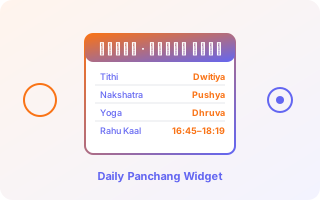
What you'll build
- A clean card showing today's tithi, nakshatra, yoga, karana, and vara — with transition end-times
- Sunrise, sunset, moonrise, and moonset for any city
- Rahu Kaal, Gulika, Choghadiya with good/bad labels
- Auto-updates daily; works for any location worldwide
Build this with AI
Copy the full prompt below, paste it into ChatGPT, Claude, Cursor, or Lovable, and get a working Next.js implementation in minutes. No coding skill required.
Step by step
01One call for everything — use /panchang/basic
The /basic endpoint returns all 5 panchang elements + sunrise/sunset/moonrise/moonset in a single 20-credit call. Unlike calling tithi, nakshatra, yoga, karana, vara, sunrise and moonrise separately (70 credits), you get everything for 20 credits — plus transition end-times that individual endpoints also provide.
curl "https://api.lifeastroapi.com/v1/panchang/basic?date=2026-04-19&time=06%3A30&tz=%2B05%3A30&lat=28.61&lon=77.21" \
-H "Authorization: Bearer YOUR_API_KEY"{
"date": "2026-04-19",
"sunrise_local": "2026-04-19 05:51:41",
"sunset_local": "2026-04-19 18:49:22",
"moonrise_local": "2026-04-19 06:47:53",
"moonset_local": "2026-04-19 21:13:29",
"tithi": {
"index": 1,
"name": "Dwitiya",
"paksha": "Shukla",
"end_local": "2026-04-19 10:49:46"
},
"nakshatra": {
"index": 1,
"name": "Bharani",
"pada": 4,
"end_local": "2026-04-19 07:09:59"
},
"yoga": {
"index": 2,
"name": "Ayushman",
"end_local": "2026-04-19 20:01:46"
},
"karana": [
{
"name": "Kaulava",
"deity": "Mitra",
"end_local": "2026-04-19 10:49:46"
},
{
"name": "Taitila",
"deity": "Aryama",
"end_local": "2026-04-19 21:08:20"
}
],
"vara": {
"weekday": "Sunday",
"lord": "Sun"
}
}02Upgrade to /advanced for Choghadiya and Disha Shool
If your app needs muhurta windows (Rahu Kaal, Brahma Muhurat), full 16-slot Choghadiya, Disha Shool, or Panchang Yogas, call /panchang/advanced instead (30 credits). It includes everything in /basic plus all muhurta data, calendar context, and same-day element transitions.
curl "https://api.lifeastroapi.com/v1/panchang/advanced?date=2026-04-19&time=06%3A30&tz=%2B05%3A30&lat=28.61&lon=77.21" \
-H "Authorization: Bearer YOUR_API_KEY"03Render in your UI
Call from your backend — never expose the API key in the browser. Cache per (date, lat-rounded, lon-rounded) for 24 hours. For real-time "current hora" or "current choghadiya slot" widgets, use /panchang/hora or /panchang/choghadiya separately and find the slot whose window contains the current time.
APIs used in this recipe
/v1/panchang/basic5 panchang elements + celestial timings in one call — replaces 7 atomic calls, saves credits.
/v1/panchang/advancedFull panchang with Choghadiya, muhurta windows, Disha Shool, Panchang Yogas, Samvat.
/v1/panchang/horaReal-time planetary hour (changes every ~60 min).
/v1/panchang/choghadiya8 day + 8 night Choghadiya slots.
Next, try building
Daily Horoscope Widget
Personalized horoscope cards driven by real-time transit data, not generic sun-sign text.
Muhurta (Auspicious Time) Picker
Scan any date window and surface the highest-scoring muhurta for weddings, housewarmings, naming ceremonies, travel.
Ready to try? You get 1,500 free credits — no card needed.
Sign up for free